


Why We Need a Rethink
In retail and CPG industries, where every digital experience shapes customer trust, one challenge remains stubborn: how do we convert Figma designs into clean, production-ready code without wasting weeks?
The traditional approach is flawed. Designers export visuals, and developers manually rebuild them into HTML, CSS, or React. Each spacing tweak or component mismatch triggers rounds of clarifications and QA, leading to design drift, where the final product no longer reflects the intended design system.
This broken cycle slows releases, drains productivity, and frustrates both sides. But it doesn’t have to.
Enter Figma, MCP (Model Context Protocol), and GitHub Copilot. Together, they transform design-to-development from a manual “handoff” into a real-time, AI-assisted workflow that keeps code aligned with design intent.
The Legacy Approach: Manual, Even with Figma
Even after Figma became the industry standard, the design-to-code process didn’t magically fix itself. Yes, Figma made collaboration easier; designers could share files, comment in real time, and create component libraries, but when it came to turning those designs into code, the process was still manual.
Here’s how it typically played out:
- Designs shared as Figma files → Developers opened the file, inspected spacing, font sizes, and hex codes using the built-in inspector.
- Developers re-coded everything by hand → Each button, card, or layout from Figma had to be rebuilt in HTML, CSS, React, or another framework.
- Pixel-by-pixel clarifications → Despite Figma’s “handoff features,” developers still asked endless questions like “What’s the padding here?” or “Should this align left or center?”
- High risk of design drift → Small inconsistencies crept in, and over time, the coded UI no longer perfectly matched the Figma design system.
- Scaling headaches → Even though Figma had reusable components, developers often coded them differently across projects, breaking consistency.
In short, Figma improved design collaboration, but didn’t solve design-to-code translation. The heavy lifting still relied on manual developer effort, which slowed down delivery and introduced errors.
The Broken State of Design-to-Code Handoffs
Let’s break down why the current process drains efficiency and why change is overdue.
1. Productivity Losses
- Developers spend hours reproducing what’s already in the design tool.
- Manual coding creates inconsistencies across projects.
- More bugs creep in, leading to extended QA and costly rework.
2. Wasted Time and Effort
- Boilerplate code gets rewritten from scratch every time.
- Design components aren’t consistently reused, leading to fragmented UIs.
- Over time, designs drift apart from the system standards.
3. Scaling and Governance Issues
- Rolling out consistent design systems across multiple apps is difficult.
- Lack of standardization makes it harder to grow products while maintaining quality.
The reality is clear: the design-to-development handoff is not just slow; it is fundamentally broken.
The New Trio: Figma + MCP + GitHub Copilot
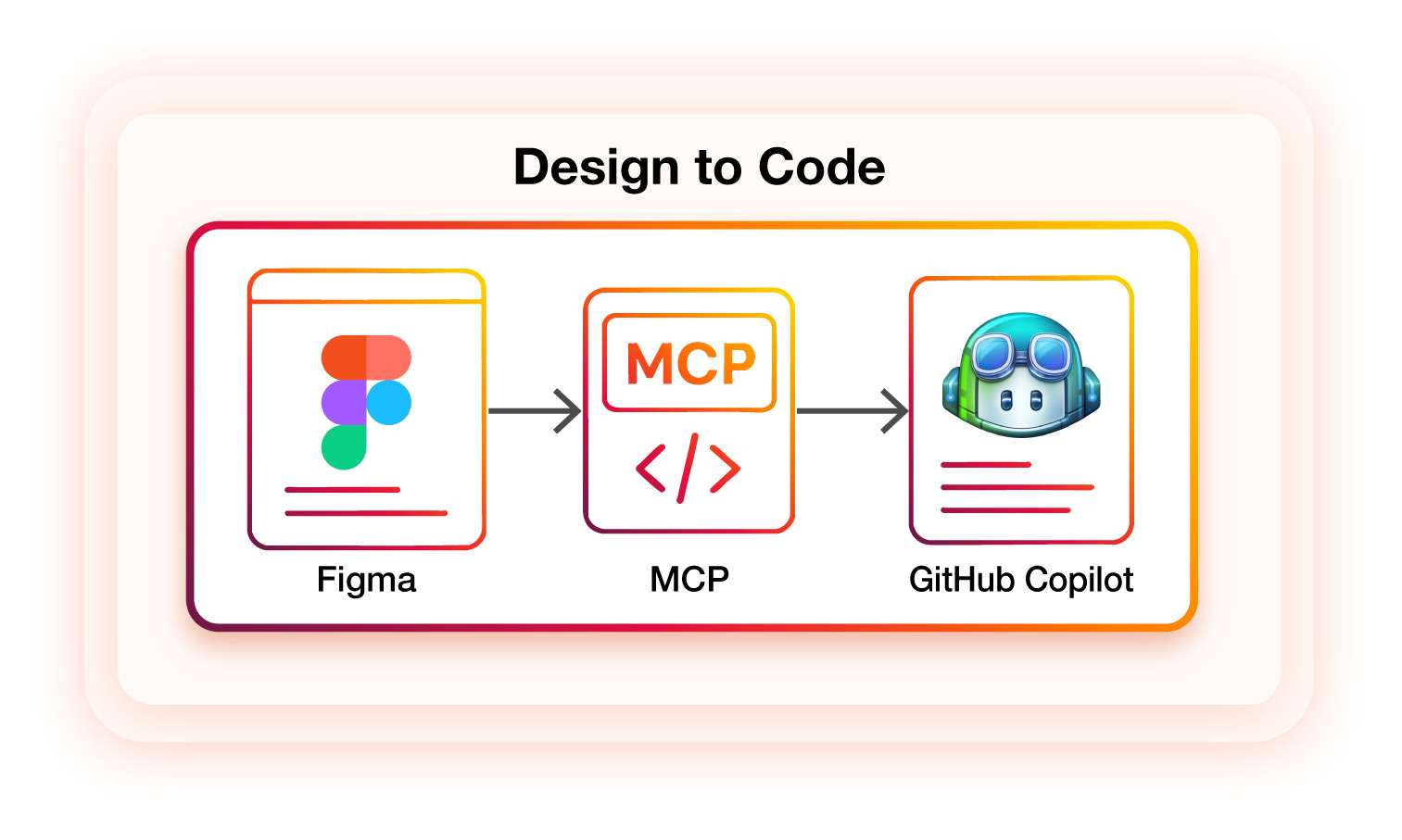
Instead of patching inefficiencies, this new workflow combines tools that complement each other seamlessly:
Figma
- More than a design tool, it’s a collaborative hub with reusable components, auto-layout for responsive UIs, and developer-friendly handoffs.
MCP (Model Context Protocol)
- The “glue” that securely connects design context with AI, ensuring Copilot generates smarter, context-aware code.
GitHub Copilot
- An AI assistant that suggests accurate, production-grade code in real time, supports multiple languages, and answers coding questions conversationally.
Together, they create a continuous pipeline where designs flow directly into code with minimal manual intervention.
How the Workflow Actually Works
Here’s how design-to-code works with this setup:
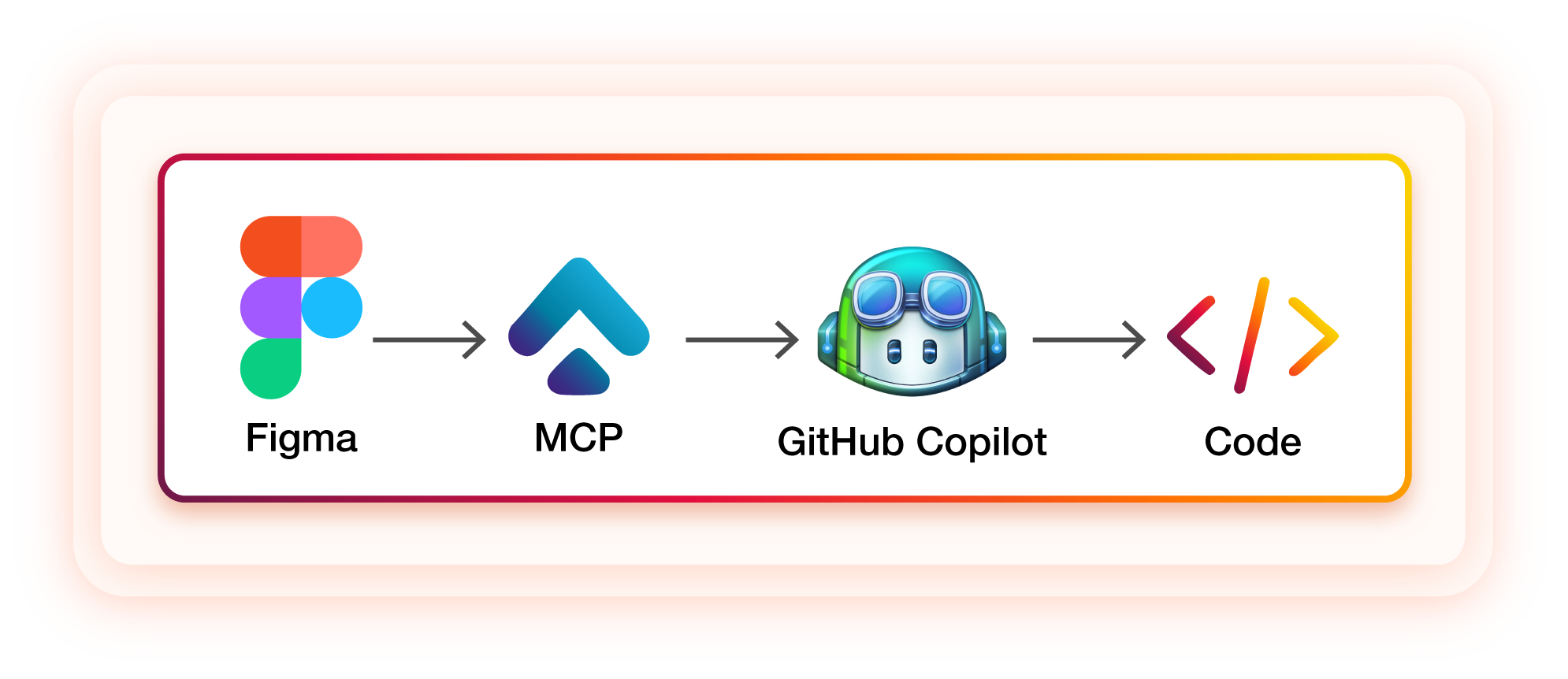
- Designers create in Figma: Layouts, prototypes, and component libraries are built collaboratively.
- MCP transmits context: Design data is securely fed into GitHub Co-pilot in real time.
- Co-pilot generates code: Clean, production-ready UI code is suggested instantly, reducing boilerplate and errors.
- Developers refine: Instead of replicating pixels, developers focus on logic, integrations, and complex problem-solving.
The result is not a “handoff” but a collaborative loop, where both designers and developers work in parallel using AI acting as the bridge.
A Real-World Use Case: From Figma to Code in Action
By embedding MCP into the workflow, design assets became actionable and directly linked to development. MCP transmitted Figma’s design context, layouts, components, and style tokens into the development environment, where GitHub Copilot generated initial UI structures automatically.
Key Highlights
- Interactive prototypes instead of static visuals → designs could be validated in code immediately.
- Reusable design tokens → (colors, spacing, typography) flowed seamlessly into development.
- Faster validation cycles → design-to-code skeletons were ready in hours instead of days.
- Faster validation cycles → design-to-code skeletons were ready in hours instead of days.
Efficiency Gains
- Legacy approach → ~7 hours spent on design handoff and clarifications.
- With Figma MCP → ~4.5 hours with direct design-to-code translation.
- Time saved → ~35% faster design validation.
This approach proved how AI-assisted design workflows cut manual translation, reduce errors, and accelerate the delivery of production-ready UI structures.
Benefits That Teams Will Notice
When design and code integrate seamlessly, the business impact is substantial:
- Time Efficiency: Developers spend less time coding repetitive layouts and more time on meaningful features.
- Better Collaboration: Misunderstandings between design and dev are minimized.
- Consistency at Scale: Shared design systems can be reused across products effortlessly.
- Higher Quality: Fewer bugs, smoother UIs, and stronger user trust.
- Cost Savings: Less rework, fewer delays, and faster release cycles.
This is not only about saving time; it is about creating better products faster.
The Future: When Design and Code Fully Merge
We are only scratching the surface of what is possible. As AI-powered tools like MCP and Copilot evolve, the boundary between design and development will blur even more.
- Designers will have more influence on production code without needing to write it.
- Developers will spend less time on repetitive UI tasks and more time solving technical challenges.
- Teams will deliver at a pace that matches the speed of modern product demands.
Imagine a future where design decisions flow directly into live codebases, and developers instantly see the impact of those choices. That is not science fiction; it is the direction the industry is heading.
Final Thoughts: From Pixels to Production
The combination of Figma + MCP + GitHub Copilot is more than a workflow improvement; it is a cultural shift in how digital products are built. Instead of treating design and development as isolated silos, this approach unites them into a shared, AI-powered workflow that reduces errors, enforces consistency, and accelerates delivery. So the next time you prepare to launch a feature, ask yourself:
Are you still manually coding from Figma, or are you ready to let AI accelerate the heavy lifting? The future of design-to-code is already here, and HTC Global Services can help you harness it. With deep expertise in Figma, MCP, and GitHub Copilot, we enable enterprises to modernize design-to-development workflows, ensure design fidelity, reduce manual effort, and deliver scalable, future-ready digital experiences across retail and CPG industries.